
图标方案
2026/7/15大约 2 分钟
图标方案
图标资源网站
通用图标库
- Icones - 强大的图标搜索引擎,集成了 Iconify 所有图标
- Iconify - 统一图标框架,支持 100+ 图标集
- Feather Icons - 简洁优雅的开源图标
- Bootstrap Icons - Bootstrap 官方图标
- Ionicons - Ionic 框架图标
- Font Awesome - 经典图标库
- Icons8 - 丰富的图标/插画资源
- Flaticon - 海量图标资源
- IconFinder - 专业图标市场
- IcoMoon - 图标字体生成器
国内图标库
- Iconfont - 阿里巴巴矢量图标库(推荐)
- IconPark - 字节跳动图标库
- CSS.GG - 纯 CSS 图标
- SuperTinyIcons - 超小体积图标
其他资源
- Uiverse - UI 组件/图标集合
Iconfont 使用
Iconfont 是国内最常用的图标方案。以下是详细使用步骤:
1. 创建项目
在 Iconfont 网站右上角"图标管理"→"我的项目",创建项目,配置好前缀。
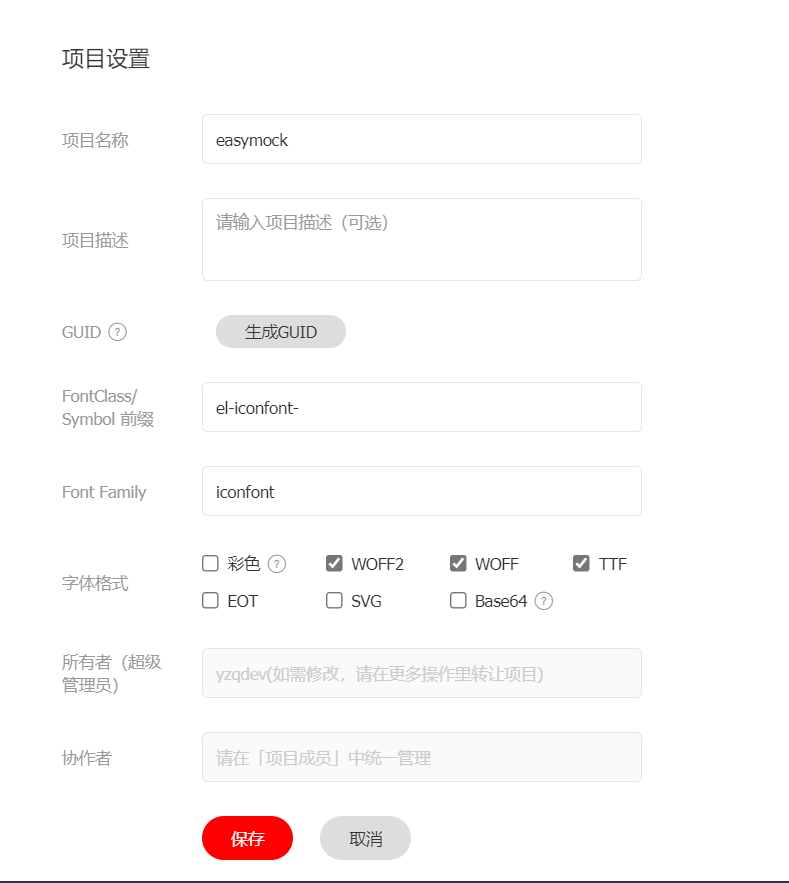
2. 引入图标
将生成的链接引入 index.html:
<link rel="stylesheet" href="//at.alicdn.com/t/font_xxxxx.css">
3. 封装组件
创建 Econ.vue 组件:
<template>
  <svg
    :class="['econ', `econ-${name}`]"
    :style="{ fontSize: size, width: size, height: size }"
    aria-hidden="true"
  >
    <use :xlink:href="`#icon-${name}`"></use>
  </svg>
</template>

<script>
export default {
  name: 'Econ',
  props: {
    name: { type: String, required: true },
    size: { type: String, default: '1em' },
  },
};
</script>

<style>
.econ {
  fill: currentColor;
  overflow: hidden;
}
</style>
4. 使用
<econ name="python" size="25px" />
<econ name="javascript" size="2em" />
Vue 2 SVG 图标方案
使用 svg-sprite-loader 实现 SVG 图标组件化。
1. 安装
npm install svg-sprite-loader -D
2. 配置 vue.config.js
chainWebpack: (config) => {
  const svgRule = config.module.rule("svg");
  svgRule.uses.clear();
  svgRule
    .test(/\.svg$/)
    .include.add(path.resolve(__dirname, "./src/icons"))
    .end()
    .use("svg-sprite-loader")
    .loader("svg-sprite-loader")
    .options({ symbolId: "icon-[name]" });

  const fileRule = config.module.rule("file");
  fileRule.uses.clear();
  fileRule
    .test(/\.svg$/)
    .exclude.add(path.resolve(__dirname, "./src/icons"))
    .end()
    .use("file-loader")
    .loader("file-loader");
},
3. 创建 SVG 组件
<template>
  <svg :class="svgClass" aria-hidden="true">
    <use :xlink:href="iconName"></use>
  </svg>
</template>

<script>
export default {
  name: "icon-svg",
  props: {
    iconClass: { type: String, required: true },
    className: { type: String, default: "" },
  },
  computed: {
    iconName() { return `#icon-${this.iconClass}`; },
    svgClass() { return "svg-icon " + (this.className || ""); },
  },
};
</script>

<style>
.svg-icon {
  width: 1em;
  height: 1em;
  vertical-align: -0.15em;
  fill: currentColor;
  overflow: hidden;
}
</style>
4. 引入图标
// main.js
const requireAll = requireContext => requireContext.keys().map(requireContext);
const req = require.context('./icons', true, /\.svg$/);
requireAll(req);

import IconSvg from '@/components/IconSvg';
Vue.component('icon-svg', IconSvg);
Vue 3 SVG 图标方案
Vue 3 推荐使用 Vite 插件,更简单高效。
使用 awesome-vite 查找
搜索 awesome-vite 中的 SVG 插件。
推荐插件
1. vite-svg-loader
npm install vite-svg-loader -D
// vite.config.ts
import svgLoader from 'vite-svg-loader';

export default defineConfig({
  plugins: [vue(), svgLoader()],
});
<script setup>
import Logo from '@/assets/logo.svg?component';
</script>

<template>
  <Logo />
</template>
2. vite-plugin-svg-icons
npm install vite-plugin-svg-icons -D
// vite.config.ts
import { createSvgIconsPlugin } from 'vite-plugin-svg-icons';

export default defineConfig({
  plugins: [
    vue(),
    createSvgIconsPlugin({
      iconDirs: [path.resolve(process.cwd(), 'src/icons')],
      symbolId: 'icon-[dir]-[name]',
    }),
  ],
});
使用 Unocss 图标
npm install @unocss/preset-icons -D
// unocss.config.ts
import presetIcons from '@unocss/preset-icons';

export default {
  presets: [presetIcons()],
};
<!-- 使用 -->
<div class="i-carbon-logo-github"></div>
<div class="i-ic-baseline-ac-unit"></div>
在 React 中使用图标
- react-icons - 最流行的 React 图标库
- MUI Icons - Material Design 图标
- shadcn/ui Lucide Icons - 基于 Lucide 的图标